How to choose a GEO tool: a checklist you can keep
Choosing a GEO tool isn't about feature lists: match engine coverage, verify the methodology, check exit costs. Ten criteria with hands-on verification, plus our own public self-assessment.
Type "GEO tool" into a search box and you'll get a wall of feature screenshots and slogans. This article won't add one more to the pile. It takes a different route: a ten-item evaluation checklist where every item ships with a "how to verify" — something you can check with your own hands, independent of any vendor's pitch. Don't decide while reading. Run the checklist against your candidates first, including us. At the end, we grade ourselves publicly against the same list, with one weak spot written down plainly.
First, figure out which of the four you're buying
People searching "GEO tool" are trying to solve four different problems, and the market really does split into four categories. Buying the wrong category wastes more money than choosing the wrong brand:
| Your problem | Category | Typical form |
|---|---|---|
| Can't see: no idea whether AI answers mention me | Monitoring | Cross-engine probing, mention/citation stats, trend dashboards |
| Can't do: know where the gaps are, no headcount | Agency service | Monthly-packaged labor |
| Can't write: no idea how to make content citable | Content optimization | Page GEO scores, rewrite suggestions |
| Just starting: little budget, need ground truth | DIY methods | Manual check methods and templates (near-zero cost) |
This checklist targets monitoring tools mainly, but seven of the ten items apply to the other three. For the DIY route, start with how to check your AI visibility for free — many teams finish that one-hour audit and realize a tool isn't what they need yet.
The four categories also carry different price shapes and moments to buy them:
Monitoring runs on subscriptions and solves "can't see." The right moment is after your manual check works and you need weekly tracking. Its output is data and gaps, not the fixes themselves — buying monitoring isn't buying results, the same cost-structure point made in what GEO pricing covers.
Agency services price by person-day or monthly package and solve "can't do." They fit teams with budget but no headcount; evaluation shifts from product features to deliverable acceptance — covered separately in the pricing article, where only two checklist items (methodology, exit cost) transfer unchanged.
Content optimization charges by subscription or per-run and solves "can't write." Two things to check: whether the score's rationale is explainable (why did this line lose points), and whether suggestions arrive as executable rewrites. A scoring tool with no reasons attached gets shelved within two weeks.
DIY methods cost nearly nothing and solve "just starting." It's not a product but a method — this checklist and the free-check article are exactly that. Their value: judgment before spending, which is why they come first in the buying order.
The ten-item checklist
| # | Criterion | Why it matters | How to verify |
|---|---|---|---|
| 1 | Engine coverage matches your market | Watching the wrong engines = measuring nothing | Compare the vendor's published engine list against the engines your customers use, one by one |
| 2 | Explainable methodology | Numbers without methodology can't be attributed | Request the methodology doc: how the prompt set is chosen, what the denominator is |
| 3 | Probe frequency & sample size | Weekly-once and daily-ten-times are different data | Ask how many prompts per batch and how often it runs |
| 4 | Trend visibility | Snapshots show no direction | In the trial, look for a timeline with week-over-week comparison |
| 5 | Gap attribution | Reports give conclusions; operations needs causes | Check whether it answers "why wasn't I mentioned" |
| 6 | Data export | A tool that locks your data is a rented cell | Ask the export format; export once yourself in the trial |
| 7 | Price transparency | Paying for negotiating skill isn't paying for product | Is there a public pricing page |
| 8 | Data-to-action loop | Show-only products halve their own value | Check whether data connects into a content-fixing workflow |
| 9 | Account & data security | Your measurement data reveals brand and competitor strategy | Read the data-ownership section of the privacy policy |
| 10 | Exit cost | Switching tools shouldn't mean starting over | Ask about cancellation flow, data migration, contract terms |
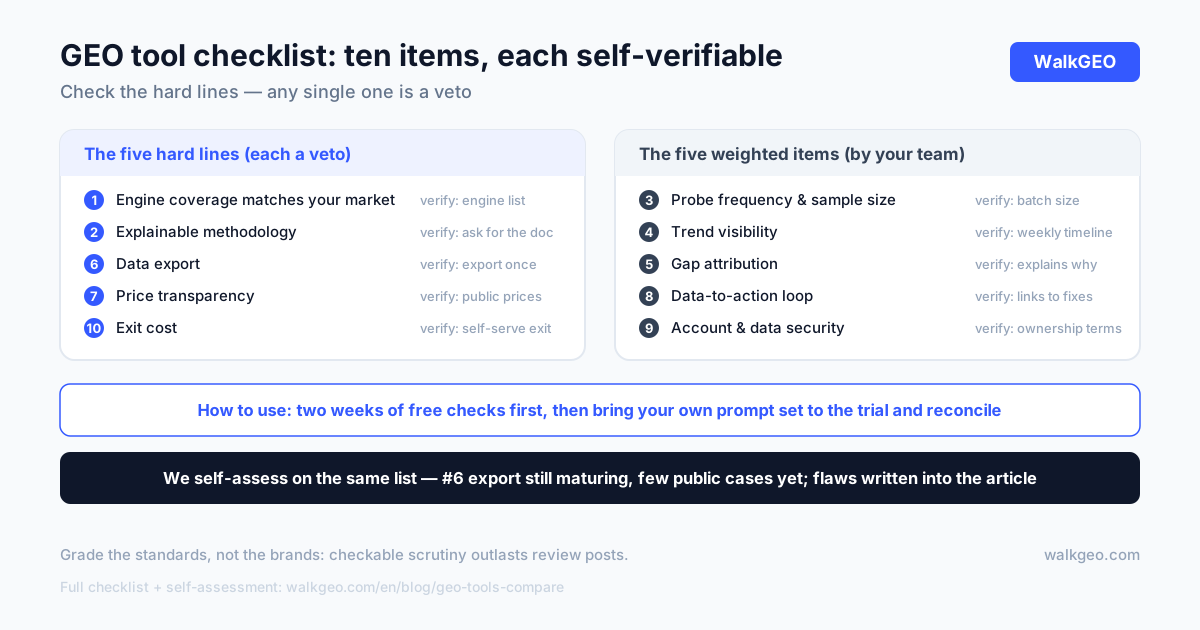
You don't need ten greens — no product takes all ten. The real use is drawing hard lines on the non-negotiables: for us those are 1, 2, 6, 7, 10 (wrong engines, fuzzy methodology, locked data, hidden pricing, no exit — any one is a veto); weight the rest by your team's situation.
Two items deserve a closer look. On #1: match the engines your customers use, not the loudest names on a listicle. For China that's DeepSeek, Doubao, Qwen, and Tencent Yuanbao; for overseas, ChatGPT, Perplexity, and Google AI Overviews. One market observation: most international tools focus on overseas engines — verify against each vendor's official published engine list before buying, and don't trust the retelling in review posts.
On #2, dig one level down: when you ask about methodology, write the answers down. "We have a proprietary algorithm" with no denominator is a fail; "mention rate = answers naming you ÷ total probes," with an explanation of how total probes are composed, is a pass. Also ask whether the prompt set is customizable — a tool that runs one fixed prompt set for every customer will never contain your customers' real questions, and data without your questions is data about nothing. No methodology document, red mark on #2.
The two most overlooked terms
Checklist items 7 and 10 usually lose to feature demos, but they set the terms of your long-term relationship with the vendor.
Price transparency. A vendor with a public price page leaves the "what is this worth" judgment with you; a vendor that wants to talk pricing has mixed negotiating room into the quote, on top of your information disadvantage. Our own practice is full public pricing (Pro ¥99/month, Business ¥299/month, as of November 2026) — and no, this paragraph isn't a detour into an ad; the public price page is itself one of the things being graded.
Exit cost. Ask three things during the trial: can data be exported, in what format, and which step of the dashboard handles cancellation. Vague answers go straight into your evaluation sheet — vendors vague about exit terms tend to be vague about performance terms too; that connection is unpacked in the five questions of GEO pricing.
Read together, the two items probe one thing: does this vendor assume you'll stay forever, or assume you might leave? The former treats transparency as a default — prices posted, data available, cancellation untouched; the latter pulls decisions into the sales process — prices talked out, data accumulated on its side, cancellation requiring a reason. You can start observing in the demo itself: how many verification entry points does it volunteer, how much room does it leave for you to check? A vendor assuming you'll leave isn't necessarily bad — but price it in: with one, every renewal and migration gets negotiated from an information disadvantage.
Trial free for two weeks, then talk payment

The checklist has an order. First run the free manual check for two weeks — you'll learn three things on the way: what your customers' real prompt set looks like, which engines are worth watching, where your gaps cluster. Then bring that self-built prompt set into candidate trials and verify two spots: do the tool's detected mentions match your manual records, and is its timeline granularity what you need.
A trial is you examining the tool with your own questions, not listening to it present its features. Fail that exam and no feature list saves it; pass, and the rest of the checklist takes under an hour.
The two-week trial script, ready to copy: week one, baseline — build your fixed prompt set in the tool, ignore its suggestions, log its detected mentions and citations, and reconcile once against your manual sheet; a big mismatch is an instant out. Week two, loop — pick one real gap from its attribution, fix it, wait for the next probe round, and check whether the movement shows up in the tool. After two weeks you've personally verified items 2, 3, 4, 5, and 6; the remaining items take under an hour.
Three recurring selection mistakes, all paid for by someone, worth dodging up front:
- Taking "guaranteed results" as a selling point. Engine crawling, retrieval, and corpus rhythms are in no tool's hands; any "our tool guarantees citations" pitch fails the one-question test — "determined by what?" — the same test from how long GEO takes.
- Checking price before coverage. A cheap tool that doesn't monitor the engines your customers use converts every yuan saved into misjudgment: "no mention" in its data may just mean it never looked. Coverage is the line-item veto; cross out the wrong ones before comparing prices.
- Treating the purchase as the finish line. Tools deliver data and workflow; humans still make the changes. Buy monitoring, then never read the weekly report or fix the gaps, and you've rented a dashboard nobody watches — which gets written up at budget review as "GEO doesn't work," when the truth is it never got used.
Self-assessment: us, against the same list
Standards that grade others must survive being graded. Here is WalkGEO scored against the same checklist, each row with a place you can verify it:
| # | Criterion | WalkGEO status | Where to verify |
|---|---|---|---|
| 1 | Engine coverage | DeepSeek, Doubao, Qwen, Tencent Yuanbao, ChatGPT, Perplexity — six engines, domestic and overseas | Pricing page engine list |
| 2 | Methodology | Prompt set is yours to define; weekly re-tests; methodology fixed to the set | Help center, weekly routine |
| 3 | Frequency & sample size | Weekly batch probing; prompt-set size is your call | Probe settings in product |
| 4 | Trends | Overview shows weekly movement in mentions, citations, share | Product Overview |
| 5 | Gap attribution | Each gap logged as an Issue with type and priority | Help center, Issues guide |
| 6 | Data export | Reports downloadable | Reports in product |
| 7 | Price transparency | All tiers and prices public; monthly, cancel anytime | Pricing page |
| 8 | Data to action | Issues → Optimize → content creation wired as one workflow | Help center |
| 9 | Security | Account isolation; data ownership written into terms | Privacy policy |
| 10 | Exit cost | Subscription; self-serve cancellation | Pricing page |
Not all green, and two rows honestly so: on #6, export currently covers reports; bulk export of raw probe records is still being built. And as a young product we have fewer third-party reviews and public case studies than the incumbents — which is why we keep turning our own site into a public case, writing up every fix in this blog. Those two weak spots don't get copywrited away; the checklist promised flaws, so flaws stay in.
FAQ
What types of GEO tools are there?
"GEO tools" is really four categories: monitoring (tracking brand mentions and citations in AI answers), agency services (human labor by retainer), content optimization (page scores and rewrite suggestions), and DIY methods (free manual checks). Figure out which problem you're solving — can't see, can't do, can't write, or just starting — because each maps to a different buying decision.
How do I judge whether a GEO tool's data is trustworthy?
Ask whether the methodology can be explained: what's the denominator behind mention and citation rates (how big is the prompt set, how was it chosen), how often does probing run, which engines are covered. A tool that can't explain its methodology gives you numbers you can't attribute. The direct test: request a methodology document, or run your own prompt set during a trial and compare against manual spot checks.
How do free checks and paid tools fit together?
Run the free manual check for two weeks first to learn what you should measure and where your gaps cluster; then bring that prompt set into tool trials and verify the tool's results against your manual records. Reversing the order — buying first, deciding what to measure later — is the most common waste in this purchase.
Why are price transparency and exit costs major criteria?
Opaque pricing means you're paying for negotiating skill, not product; high exit costs (locked data, annual lock-ins) mean switching tools means starting over. Both determine your long-term bargaining position with the vendor, and both get drowned out by feature demos. Verification is simple: is the price page public, can data be exported, is cancellation self-serve?
Half the traps in choosing a GEO tool live outside the product: fuzzy methodology, locked data, hard exits. A checklist with "how to verify" on every line outlasts ten review posts — it forces every vendor, us included, to accept checkable scrutiny instead of storytelling. WalkGEO's self-assessment is above, weak spots included; run the list against us anytime. Product and pricing is the verification hub, and the help center holds the operating details.
Done reading? Run the same audit on your own site
Sign up, then let the agent scan every page and hand you a prioritized fix list. Your first audit is free.
Run a free site audit