How to check your AI visibility for free
No tool needed to check brand mentions in AI: probe a prompt set by hand, trace sources behind competitor answers, verify indexing and crawler gates — one hour to your first baseline.
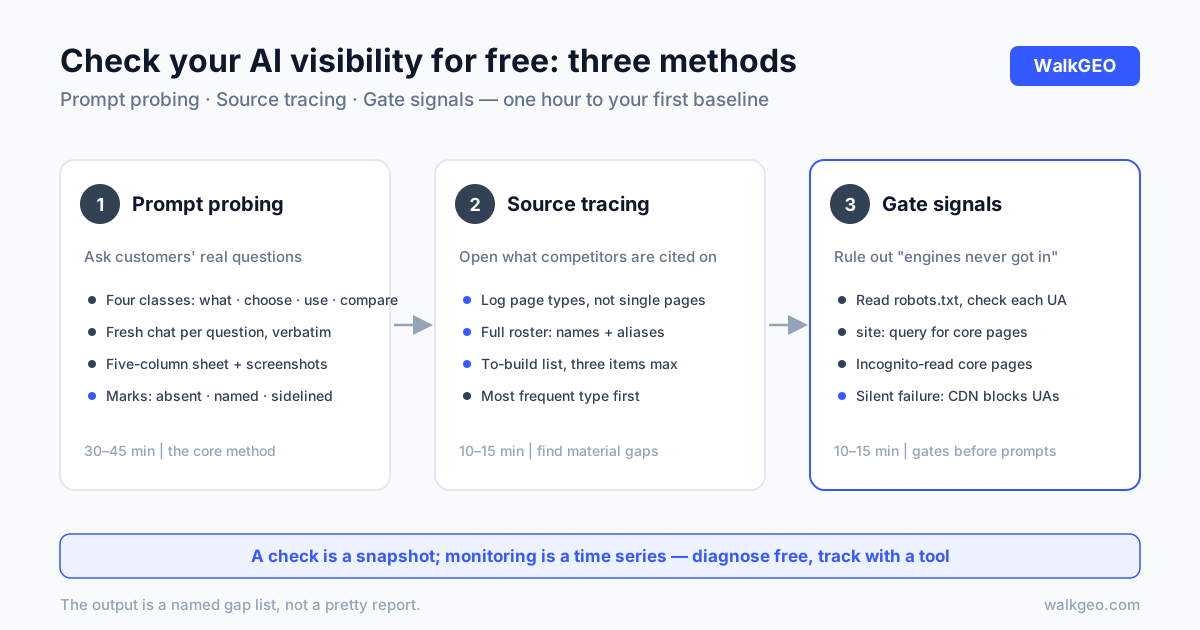
You don't need a tool to check whether AI mentions your brand — a connected laptop and one hour will do. There are three methods: ask your customers' questions to AI engines one by one (prompt probing), open the sources behind the answers (source tracing), and verify your site's indexing and crawler gates (gate signals). Each answers a different question, and together they cover the full cause list of "AI can't find me." This article walks through each method's mechanics, reading rules, and limits, and ends with our real first-week manual measurement — that's exactly how our own measurement system started.
What each method answers
Know what each card is for before you start, or you'll finish the hour with no conclusion:
| Method | The question it answers | Time | Causes it diagnoses |
|---|---|---|---|
| Prompt probing | Which answers include me, which don't | 30–45 min | Mention gaps, competitor pressure, role positioning |
| Source tracing | Which pages competitors win with | 10–15 min | Citable material gaps, listicle effect |
| Gate signals | Can engines even reach my site | 10–15 min | Crawler blocks, missing indexing, unclear entity |
Recommended order is bottom-up: confirm the gates are open (signals), ask the questions (probing), then study the winners' material (tracing). When the gate is closed, the "not mentioned" you record is a gate problem, not a material problem — checking gates first prevents misdiagnosis. The triage logic matches the four gates in why AI doesn't mention your brand; that one is the full diagnostic, this one is the free fast version.
Method one: prompt probing by hand
The core of the three — essentially a manual run of the "first baseline probe" from the measurement framework.
Step 1: build the prompt set. Use sentences sales and support actually hear, three to five per class:
- What-is: how customers describe your category ("is there a tool that gets my brand into AI answers");
- How-to-choose: purchase decisions ("X or Y, which one", "how much does X cost");
- How-to-use: operations and breakage ("how do I configure X", "why isn't X working");
- Who-to-compare: comparisons ("how does X compare with Y").
Fifteen to twenty questions total — small enough for one hour. Don't ask by internal product names; customers don't ask questions following your org chart.
Step 2: fix the engines, ask verbatim. For China, start with Doubao, DeepSeek, Qwen, and Tencent Yuanbao; add ChatGPT and Perplexity for overseas. One fixed batch per sitting, a fresh conversation per question — context carryover pollutes results.
Step 3: record. One sheet, five columns: question, engine, answer summary, brands named, source links. Screenshot the raw answers — two weeks later, when you want to verify "was I actually mentioned," memory won't serve but screenshots will.
Three reading rules: no mention at all → log "absent"; named without your link → log "named, no source" (the model knows you but has nothing citable on your site); competitor's link cited, yours missing → log "source sidelined." Each mark maps to a different prescription — the gap-type table in the measurement article covers the remedies.
Add one layer beyond the marks: role reading. Being named as a recommendation ("consider X"), as a comparison point ("compared with X, Y offers…"), or as a one-line footnote are worth very different amounts. Tag each appearance's context — first pass needs only three tiers: recommended / compared / mentioned-in-passing. When roles upgrade across weekly re-tests, that says more than raw counts.
Two questioning disciplines, and the data is void without them: a fresh conversation per question — follow-up inside a contaminated thread makes the engine ride your topic's momentum, not real retrieval behavior; and probing "why do you recommend it" is fine, but the record is the first raw answer — post-probing elaborations don't count. You're simulating the customer's first look, not conducting an interview.
Method two: trace the cited sources
Every time a competitor gets recommended, open the sources hanging under the answer and classify the page types. The output isn't "who beat me" — it's "which page types the winners win with": parameter comparison tables, "best tools" listicles, use-case pages, FAQs. The two or three types recurring across ten recommendations are your to-build list.
Log the full competitor roster: official names, common aliases, abbreviations together — official names alone miss half the appearances. The full attribution playbook lives in when AI recommends your competitors.
Close the loop by turning findings into a to-write list: tag each page type with its frequency (how many rounds it recurs in) and your gap against it (missing / present but losing). Build the most frequent first. Cap the list at three items — beyond that, your prompt set is too wide; narrow it before building. The value of a free check is speed and precision, not exhaustive coverage.
Method three: gate and indexing signals
Before trusting any "not mentioned," rule out one possibility: the engines never got in. Three free checks, ten minutes:
- Read your own robots.txt. Open
yourdomain/robots.txtand check whether GPTBot, ClaudeBot, PerplexityBot, and OAI-SearchBot are Disallowed. CDNs and firewalls blocking "unknown UAs" by default is a common silent failure — the per-UA audit lives in don't block AI crawlers. - site: query. Search
site:yourdomain core-page-keyword; if core pages don't surface, check your search console's crawl status first — retrieval engines cite through the search stack. - Open core pages in incognito. Can the body text be read without login? Most crawlers don't execute heavy scripts; unrendered content is invisible content.
All three pass and you're still invisible — then it's a material problem; go back to the outputs of methods one and two.
The limits: what a free check can't do
An honest line: the shared weakness of all three methods is the missing time axis.
- A single check is a snapshot. Engine answers have real randomness — not being mentioned today doesn't mean your visibility is falling. One pass locates major disease; it cannot judge trend. Trends need three or four weekly observations — the reading rules live in the four-week checkpoint of how long GEO takes.
- Manual records can't attribute. Which change caused which movement, whether a competitor's wobble relates to you — spreadsheets don't answer that.
- Past twenty questions, manual work falls apart. Twenty prompts an hour is fine; a hundred is a day and still unfinished.
So the right usage is check first, monitor second: free methods diagnose and establish the first baseline; adopt a tool when you need weekly comparison, batch probing, and attribution — and by then you also know exactly what to measure, so the money is well spent. Reverse order (buy the tool, then wonder what to measure) is this industry's most common waste.
The check itself has three failure modes worse than not checking, because they produce confident wrong conclusions:
- Rephrasing until you hear what you want. First pass misses you, so you try another phrasing, and another, until you appear — that's wishing, not checking. Changed phrasing breaks comparability, and the "found it" pass is just the one you cherry-picked.
- Testing only your brand name. Ask "how is X" and of course you appear — the model is echoing the name you fed it. Customers ask category and scenario questions ("is there a tool that…"); absence there is the real gap.
- Checking eight times a day. Answer-sampling variance is bigger than you think; same-day swings are all noise. Three checks in one day concluding "I'm not mentioned" mean nothing — fixed weekly slots are what make results meaningful.
Case: our first week was manual
We ran these free methods to the letter. WalkGEO's measurement system spent its first week with zero tools, entirely by hand:
Fix three things. The prompt set was built across four classes — category, comparison, scenario, purchase — with sentences from what we assumed customers would ask ("is there a tool that gets my brand mentioned in AI answers," "GEO or SEO first"); the engine set started with the four domestic engines; the competitor list went into one sheet, aliases included.
First probe. Ask each, record each — the five-column sheet filled for one round. The verdict was one word: weak. Most of our pages were still "Discovered – currently not indexed" in search; indexing itself was on the way. Category questions contained almost no mention of us, because not a single page on the site answered those questions. That "weak" is the baseline — not shameful; having no baseline is.
Tracing and gates ran the same week. Which pages hung under competitor recommendations, whether our own robots.txt blocked anyone — both checked in passing that week. The free checks in fact caught two real machine-face defects for us (a missing crawler allowance, two files contradicting each other); the fix records live in the case sections of the crawler audit and the ChatGPT citation guide.
What followed was writing against the gaps and weekly re-tests — the blog you're reading is that first sheet's gap list, digested line by line. The free check's biggest gift wasn't that round's results; it was knowing what to measure.
The one-hour checklist
Condensed into something you can execute today. Total: one hour; nothing to install — a browser with engine access is enough:
- (10 min) Build the prompt set: three to five customer sentences per class;
- (10 min) Gate trio: robots.txt, site: query, incognito read of core pages;
- (30 min) Probe: fixed engines, verbatim questions, five-column sheet;
- (10 min) Trace sources: classify cited pages under competitor recommendations;
- (5 min) Write the baseline: counts of "absent," "named, no source," "source sidelined."
Those three numbers are your starting point. Run the same sheet four weeks later and compare — by then you'll know better than anyone whether you need a tool, and which one.
A free check's output is a named gap list, not a pretty report — that's exactly its value. WalkGEO turns prompt sets, probing, and gap attribution into a weekly closeable routine; to skip the spreadsheets, look at product and pricing. To start checking today, the checklist above is the whole starting point.
FAQ
What can a free AI visibility check tell me?
Three things: which questions surface your brand in AI answers, which pages competitors get cited on in those same answers, and whether your site's indexing and crawler gates are healthy. That's enough to diagnose the major causes of "AI can't find me" and to build a first baseline. What it can't do: week-over-week trend comparison, cross-engine batch statistics, and attribution of changes to specific actions — those require continuous monitoring, not a one-off check.
Which questions should I ask in the check?
The sentences customers actually use, not internal jargon. Pick three to five from each class: what-is (category awareness), how-to-choose (purchase decisions), how-to-use (operations), and who-to-compare (comparisons). Keep the total small enough to ask within an hour. Ask verbatim, and record the raw answer, brands named, and sources cited — that sheet is your first AI visibility baseline.
How often should I run the free check?
Judgment questions (am I being mentioned?) once a week; gate and indexing signals recheck any time you change something. Engine indexing and answer sampling both lag — same-day swings are noise, and dense checking only scares you. Trend judgment needs at least three or four weekly observations.
When is the free check not enough?
Three signals: your prompt list outgrows one spreadsheet; you need comparable weekly data instead of one-off snapshots; you need to attribute movement to specific changes. All three share one property — continuity. A check is a snapshot; monitoring is a time series. Check first to diagnose, then adopt a tool to track — never in reverse.
Done reading? Run the same audit on your own site
Sign up, then let the agent scan every page and hand you a prioritized fix list. Your first audit is free.
Run a free site audit