Is your site blocking AI crawlers? A robots.txt check
AI crawler blocks fail silently. A three-layer audit — robots.txt declaration, CDN/WAF enforcement, content rendering — with a seven-crawler reference table and a real miss we caught in our own file.
When you finish this guide, you'll know whether AI crawlers can reach your site — or catch them being silently blocked, and know how to open the door. Prerequisite: access to view and edit your robots.txt and CDN rules (ask IT or your site vendor). The method: a per-user-agent audit checklist, a table of where blocks usually hide, and a real case that happened to us today, mid-audit.
Meet the crawlers before you allow them
"AI crawlers" is not one crawler. It's several visitors with different jobs — and different consequences for your GEO:
| User agent | Operated by | What it does | Why it matters for GEO |
|---|---|---|---|
| GPTBot | OpenAI | Fetches content for training and retrieval corpora | Raw material for being cited in ChatGPT answers |
| OAI-SearchBot | OpenAI | Real-time retrieval for ChatGPT Search | Whether search mode can find you at all |
| ChatGPT-User | OpenAI | Browsing triggered by a user in real time | When a user asks ChatGPT to open your page |
| ClaudeBot | Anthropic | Training and retrieval fetching | Raw material for Claude answers |
| PerplexityBot | Perplexity | Real-time retrieval for the answer engine | The direct path to Perplexity citations |
| Google-Extended | Controls content use for Gemini training | The switch for Gemini corpus coverage | |
| Googlebot | Conventional search crawling and indexing | The retrieval base under AI Overviews |
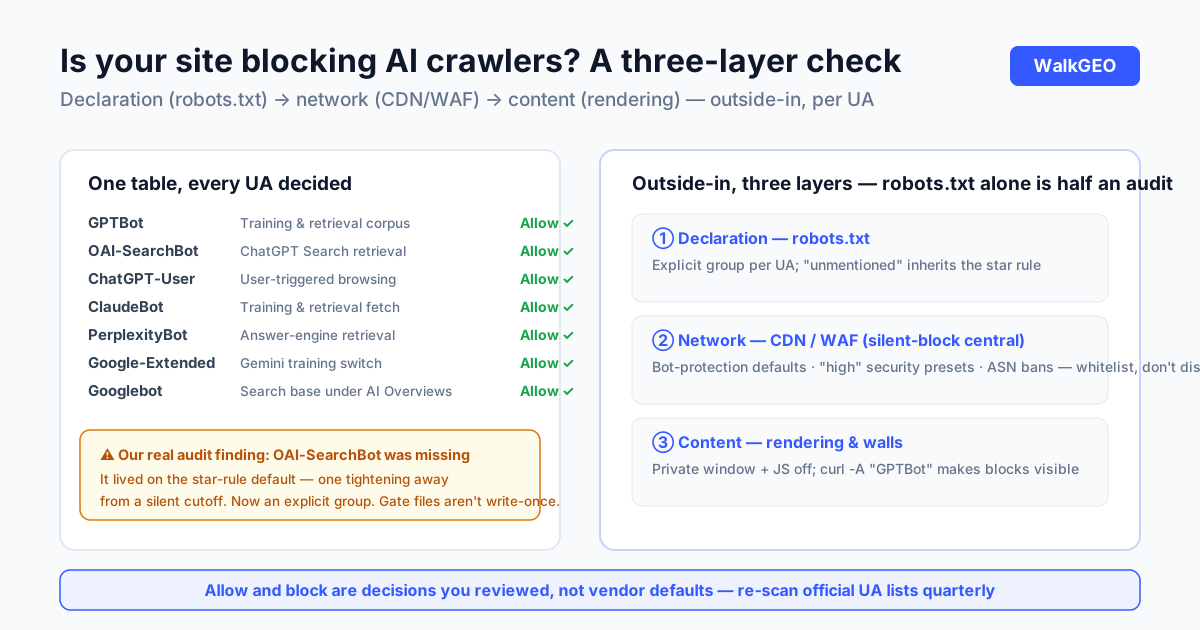
Two confusions to clear up. First, Googlebot is part of the AI stack — AI Overviews' real-time retrieval rides the Google search index. If Googlebot can't crawl you, AI Overviews can't cite you. So "allow AI crawlers" starts with confirming conventional search crawling works. Second, training fetches (GPTBot) and user-triggered browsing (ChatGPT-User) are independent: blocking one doesn't block the other. Why does one company run three user agents? Different roles, and your trade-offs may differ by role — which is exactly why decisions are made per UA. This file should reflect decisions you reviewed, not your CDN's defaults.
What you need
| Item | Notes |
|---|---|
| robots.txt read/write access | Usually the web root or your hosting panel |
| CDN / firewall rule access | Cloudflare, WAF panels — where silent blocks hide |
| A decision log | One row per UA: allowed or not, at which layer, why |
Worth an afternoon of your time, and here's why: real-time retrieval is half of the citation pipeline (the other half is what models already know from training data) — both halves start with fetching. A site that blocks fetching cuts the retrieval path at its source. Every citable page you write afterward stays invisible to that path. That's why AI crawler access is a weighted item in our GEO readiness score: with the door shut, everything else is internal damage.
The audit runs outside-in, three layers: DNS/CDN layer, web-server layer, robots.txt layer. The same failure can hide in any of the three; checking only robots.txt is half an audit.
Step 1: Read your robots.txt
What: open yourdomain.com/robots.txt and check each UA from the table. Why: this is the declared access policy; allow and block live here in the open. Done when: you know whether each AI UA is explicitly allowed, explicitly blocked, or unmentioned.
The three states mean different things. Explicit allow is the stable one. Explicit block means someone decided — verify the decision is still yours to agree with. "Not mentioned" inherits the User-agent: * rules — most sites allow by default, but some CDN-generated templates ship tightened star rules, and that's the first source of silent blocks.
In a healthy file, each UA gets its own group, like this (copy and adapt):
User-agent: GPTBot
Allow: /
Disallow: /app/
Disallow: /api/
Swap in your own private paths: Disallow where content is truly private, allow everywhere your content lives.
Step 2: Check the CDN and firewall layer
What: log into your CDN or WAF console and inspect bot management, security presets, and UA rules. Why: this layer logs nothing back to you — it's the most common home of silent blocks. Done when: no rule is intercepting AI UAs, or one is and you know and endorse it.
Three usual ambush points:
- Bot protection defaults. Many CDNs' bot management blocks "known bots" or "unverified bots" out of the box — and the list includes GPTBot, ClaudeBot, PerplexityBot. You never configured this; the vendor decided.
- Security level "high". Some WAF presets challenge or block requests without browser fingerprints — which is every AI crawler.
- ASN or country blocks. Rules that blanket-ban cloud-provider IP ranges catch crawler exits as collateral.
When you find a blocking rule, don't flatten it — read what else it stops. Malicious crawlers do share traits with the ones you want. The fix is usually whitelisting the specific AI UAs, not disabling the protection.
Step 3: Verify the content is actually reachable
What: confirm key pages render for a client with no browser environment. Why: an open door isn't visible content; login walls and pure client-side rendering are the second hidden gate. Done when: core page body text is readable without login and without script execution.
Three moves:
- Private window: the body text is directly visible, no clicks, no login. Check mobile too — some responsive sites serve less content to mobile UAs.
- Disable JavaScript and reload: text still there, crawlers can read it; text gone (a pure SPA), consider server-side rendering or pre-rendering for key pages.
- Index check:
site:yourdomain.comfor core pages — Googlebot underpins AI Overviews, so fix problems on the search side first.
For a harder test, request your own pages with a crawler UA: curl -A "GPTBot" -s -o /dev/null -w "%{http_code}" https://yourdomain.com/some-page. A 200 means through; a 403 or 406 means the network layer is blocking — which is step 2's problem. Run every UA in the table through it and network-layer blocks surface at once. Skip it if you don't use a terminal; the console checks in step 2 reach the same conclusions.
Step 4: Write the rules and log the decisions
What: fix robots.txt per the audit — explicitly allow what should be allowed; record every decision. Why: without the log, nobody can say next year why a rule exists. Done when: robots.txt explicitly covers every UA in the table, and the log lives somewhere the team can find.
Explicit writing pays off in semantics: the future you (or whoever inherits) reads "GPTBot: allowed, per the 2026-11 audit" instead of "a guess, probably the default." Four columns suffice: UA, allowed or not, at which layer, date and rationale.
On hosted platforms the same moves exist under different names: WordPress, Shopify, and most builders let you edit robots.txt or inject custom headers; CDN panels allow per-UA rules. Different locations, same principle — find both switches (the declaration layer and the enforcement layer) and set each to your decision.
Common traps
| Symptom | Cause | Fix |
|---|---|---|
| robots.txt allows, still never cited | CDN/WAF layer is blocking; robots.txt only declares | Step 2: bot management, security presets, ASN rules |
| A new engine's crawler appears; your file predates it | Rules copied from a template months ago | Re-scan official UA lists quarterly; add newcomers |
| Traffic explodes after allowing — malicious bots | You allowed a UA string, not an identity | Use reverse-DNS verification where offered, not blanket allow |
| Only one engine allowed | You only knew the engine you personally use | Decide all seven rows; don't skip answer engines like PerplexityBot |
Disallowed /app/ and a product page vanished |
Path written too broadly | Disallow precise private paths; allow content paths explicitly |
On row three: allowing AI crawlers and blocking malicious ones are not in conflict. One issues passes for public content; the other guards private resources; both live in different sections of the same rules. The mistake is treating "block everything unrecognized" as the safe default. The real default should read: public content welcomes verification, private content refuses it.
Case: our own file was missing one — found mid-audit
Writing this article was itself an audit, and it caught something on the spot. Our robots.txt is generated by the build script and covered five UAs: GPTBot, ChatGPT-User, ClaudeBot, PerplexityBot, Google-Extended. Checking the list against each provider's documentation, we found OAI-SearchBot missing — the crawler OpenAI ships separately for ChatGPT Search. Training goes through GPTBot, user browsing through ChatGPT-User, search retrieval through OAI-SearchBot: three roles, three UAs. Our file had no explicit entry for it, so it inherited the User-agent: * rules — which happened to allow, so nothing was actually blocked. But that's living on defaults: the day someone tightens the star rules, search retrieval goes down silently, with no error on our side.
The fix: an explicit group for OAI-SearchBot, same form as the others, generated by the build. The lesson is the same one as the llms.txt registration story: gate files aren't write-once. Engines ship new crawlers; your file stands still. A quarterly re-scan of the official lists is the cheapest insurance in this whole process. One timing note that makes the point for us: the miss happened while writing this article — we built the UA table, ran our own file against it, and hit a finding on the third row. The checklist paid for itself immediately.
One verifiable side note: the UAs we allow and the paths we block are managed by one logic — content pages open to AI crawlers, the /app/ application routes closed to everything. The file's current state is public at walkgeo.com/robots.txt.
How you know it worked
Four checks, all self-serve:
- Declaration layer: robots.txt explicitly covers every UA in the table; readable via curl.
- Network layer: no CDN/WAF rules intercepting AI UAs — or there are, and you know.
- Content layer: core pages render body text in a private window and with JS off.
- Index layer: core pages show up in a
site:search.
Outcome verification takes patience: after allowing, the retrieval path wakes up on the next crawl — days to weeks depending on how often the engine visits your site. Whether it then cites you is decided by your citable material, measured with the frozen question set. If all four layers pass and engines still don't name you, the door isn't the problem — go check entity and material, in the order of why AI doesn't mention your brand. Door, entity, material, question set: four layers of one diagnosis, and this article owns the cheapest, most-overlooked one.
FAQ
Does allowing AI crawlers mean giving my content away?
Public content is already published for search engines to read; AI retrieval just adds a class of readers. The real lever is training versus retrieval: if you want answers but not training corpora, allow PerplexityBot and OAI-SearchBot while blocking GPTBot — decide per UA group, no need for all-or-nothing.
If I write Disallow in robots.txt, will AI definitely not fetch?
It's not enforcement. robots.txt is a protocol — mainstream engines honor it, but nothing technical enforces it. Hard blocking requires the network layer (WAF/UA rules). The reverse matters too: changing only the WAF while ignoring robots.txt leaves your declared policy and your actual behavior in conflict.
How do I find out a given engine's crawler name?
Each provider documents it — OpenAI, Anthropic, and Perplexity publish crawler pages with exact UA names and purposes. Don't write rules from secondhand UA strings; a wrong name equals no rule.
Does a small site need to bother?
More, not less. Big sites tend to have someone watching defaults; small sites run on factory settings for years — and factory settings often include the block-AI-bots preset. A ten-minute audit may resolve the cheapest root cause of "why am I never cited."
Crawler access is the cheapest step in GEO: an afternoon of checks for an open retrieval path. It decides whether engines can find you; whether they then cite you belongs to entity and material — the other two pieces. This file also has a property nothing else replaces: it's the one sentence your site says to every machine. When robots.txt, llms.txt, and the sitemap tell the same story, the site's machine face is complete. WalkGEO includes AI crawler access in its GEO readiness score and flags it red when missing — see pricing for the full picture, or start with the five-minute setup in our help center.
Done reading? Run the same audit on your own site
Sign up, then let the agent scan every page and hand you a prioritized fix list. Your first audit is free.
Run a free site audit