How to optimize for Google AI Overviews
AI Overviews optimization has one gate: the page must be indexed and snippet-eligible — Google says so. Five steps on query fan-out, answer capsules, and weekly Search Console verification.
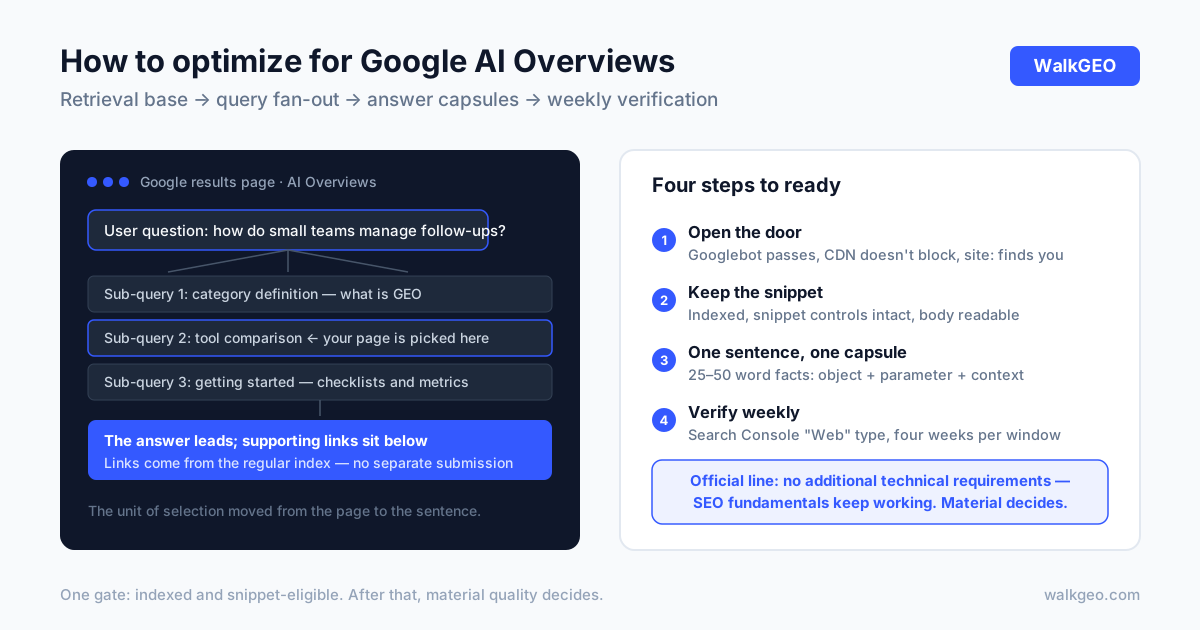
After this guide you can do three things: confirm your pages meet every eligibility condition for AI Overviews, shape your material to the way Overviews actually select sources, and verify results on Google's own terms. Prerequisites: no crawl blocks against Googlebot, access to Search Console, and a one-sentence definition of what your product is. The headline first: Google's AI features guidance for site owners says there are no additional technical requirements — getting cited by Overviews is won with indexing, snippet eligibility, and citable material. Old-fashioned, checkable, unglamorous.
What you need
| Item | Notes |
|---|---|
| Search Console access | A verified property; you'll live in the Performance report |
| robots.txt / CDN rule visibility | To confirm what Googlebot and other crawlers may pass |
| Core page list | 5–10 pages you most want cited, each with one target question |
| A tracking sheet | Frozen query set, recorded weekly: impressions, clicks, supporting-link placements |
Define the object before optimizing it: AI Overviews is Google Search's AI summary layered on top of classic results; its supporting links come from the regular search index, and there is no submission channel separate from Search. That sentence unpacks into three operational facts. The retrieval base is Googlebot and the search index, so the eligibility floor is the ordinary search floor. The concrete form of "being cited" is a supporting link under the answer. And there is nowhere to submit — every optimization lands on your pages and your standing in regular Search.
How Overviews differ from classic results
AI Overviews is not a new search engine. It is a new answer layer on the same results page — the work overlaps heavily with SEO, but the success condition changed:
| Dimension | Classic results | AI Overviews |
|---|---|---|
| What success looks like | A rank; one blue link | A supporting link; the answer leads |
| Unit of selection | The page | The sentence — a capsule adopted whole |
| Retrieval pattern | One query, one match | Query fan-out: parallel searches across subtopics |
| Measurement tool | Search Console Performance | Same report, counted in the "Web" type |
| Trigger | User searched → results shown | Only when judged additive; often absent |
The last two rows deserve a pause. Google defines query fan-out as issuing multiple related searches across subtopics and data sources to build one response — your page can be picked up by any single subquery, so topical coverage matters more than a single keyword rank. And "often absent" means you cannot verify anything from one-off searches; you need weekly data on a frozen query set, or everything you see is sampling noise.
Step 1: Let Googlebot in
What: confirm Googlebot can crawl the site, and that your decisions about other AI crawlers are explicit. Why: Google's documentation states that robots.txt directives for Googlebot are the control site owners have over how their site is crawled for Search — the AI features included. If the base is cut, nothing downstream matters. Done when: Search Console's URL Inspection fetches your core pages cleanly.
Three checks:
1. robots.txt allows Googlebot
Open yourdomain.com/robots.txt and make sure nothing disallows Googlebot. Ours allows everything in the wildcard group (Allow: /) and disallows private app routes explicitly — access should be a decision you made, not a hosting default.
2. CDN and firewall don't block search crawling
Cloudflare, Nginx WAFs, and cloud "bot management" tiers may challenge requests without browser fingerprints — Googlebot included. This layer fails silently, so audit it once deliberately.
3. Decide Google-Extended separately
It governs use of your content for Gemini training and grounding in some other Google systems — not Overview retrieval. Training and retrieval are two switches; make two decisions. The full user-agent table is in is your site blocking AI crawlers?
Step 2: Get indexed, keep the snippet
What: bring core pages to Google's stated eligibility line — indexed, and eligible to show with a snippet. Why: per the official guidance, a page must be indexed and snippet-eligible in Google Search to appear as a supporting link; there are no additional technical requirements. Done when: every core page shows up in site: searches with a healthy snippet.
Three moves:
1. Close the indexing gaps
Check core pages with site:yourdomain.com; submit missing ones via sitemap or URL Inspection. Our sitemap is generated at build time and new articles land in it on release — indexing is the first queue.
2. Keep the text readable
Open core pages in a private window, then with JavaScript disabled: body text visible without login, without clicks, without waiting on scripts. Most crawlers don't execute heavy JS; unrendered content does not exist.
3. Audit preview controls
Look for leftover nosnippet, max-snippet: 0, or similar meta tags from old templates — a page that cannot show a snippet has also forfeited its Overview eligibility.
Step 3: Organize material for query fan-out
What: rewrite core pages as one answer capsule per question, with subtopics in their own sections. Why: fan-out splits a question into many sub-retrievals, each looking for statements that stand alone outside context — the unit of selection moved from the page to the sentence. Done when: every core page carries at least one complete 25–50 word factual sentence.
A qualified capsule has three parts: object, concrete parameter or scope, context.
- Wrong: "We have years of experience delivering one-stop solutions." — zero information in any answer.
- Right: "Founded in 2019, serving 200 B2B customers, focused on manufacturing after-sales workflows." — the model can quote it to answer "how big is this company."
On the page, that becomes structure: definition sentence in the first screen, parameters in tables, FAQ at the end, every subtopic under a heading that states its own conclusion. This is not a special recipe for Overviews — it is the standard form of citable content; Overviews just made "the sentence is the unit" explicit. Structured data follows the text: FAQPage on FAQ sections, TechArticle on articles, Organization for the company — Google's requirement is that it match the visible text on the page; markup that contradicts the prose undermines both. The full framework is in what GEO is.
Step 4: Verify in Search Console, weekly
What: freeze a set of core queries and review impressions and clicks in Search Console's Performance report every week. Why: Google counts AI features traffic in the Performance report under the "Web" search type — no extra tool needed, just a frozen aperture. Done when: four consecutive weeks on the same query set.
Watch three numbers: impressions on core queries (your material entered the retrieval field), clicks (the answer gave you a supporting slot), and the weekly trend of average position (relative movement). Overview triggering itself fluctuates, so single days are noise; use four weeks as one observation window and read week-over-week. Layer Analytics on top for post-click behavior — Google's own observation is that clicks from pages with AI Overviews are higher quality, with users spending more time on site. The full measurement protocol is in how to measure brand AI visibility.
Common traps
| Symptom | Cause | Fix |
|---|---|---|
| "My page never appears" | Overviews often don't trigger; sampling artifact | Weekly reviews on a frozen set; never a single query |
| Checked the day after a fix | Crawling and indexing both lag | Give Googlebot days to weeks; don't roll back mid-wait |
| Wrote Schema, waiting for citations | Markup doesn't match visible text | Reconcile every markup item against the page; delete what conflicts |
| Blocked crawlers to "fight AI" | Blocked the entire retrieval base | Use Google-Extended to split training from retrieval; leave Googlebot alone |
| Optimized only the homepage | Fan-out selects material per subtopic | One dedicated page per core question |
A note on the third row: structured data is not a new place to stuff keywords. It answers "who is this page about, and what are the facts" — it only has verification value when it descends from the same text. We have seen sites whose FAQPage markup doesn't match the questions on the page; not marking at all would have been more honest.
Case: our own Google-side checklist
The five steps above are the order we actually executed on walkgeo.com, not a list transcribed from documentation. Four verifiable pieces:
- The door, managed explicitly. Our robots.txt allows Googlebot via the wildcard group with private app routes disallowed; six AI crawler user agents get explicit groups, and Google-Extended stands alone — training and retrieval decided separately. The current file is public at walkgeo.com/robots.txt.
- Indexing on rails. sitemap and llms.txt are generated at build time from the article manifest; new articles enter the sitemap on release, and "submit in Search Console" is a fixed line on the release checklist.
- Markup descends from the text. TechArticle on articles, FAQPage on FAQ sections, Organization site-wide — with 立言GEO and WalkGEO bound as one entity in the alternates, and hreflang pairs across both languages. Every marked fact comes from visible page text.
- Weekly readings. We run frozen question sets across engines through our own product, and read Google-side data in Search Console under the "Web" type, per step 4. One checkable precedent: our optimization pipeline took an existing page from a composite GEO score of 63.5 to 85 — the process is recorded in our help center's content optimization guide.
An honest boundary: we won't quote "AI Overview citations grew by X%" in this article — our comparable weekly series hasn't accumulated enough observations to publish, and printing a number anyway would be fabrication. When the data isn't ready, leave the number out. That is part of this article's method too.
FAQ
Will AI Overviews replace SEO?
Google's own guidance says no special optimization for AI features is required — the SEO fundamentals keep working: crawlable, indexable, people-first content. What changes is the shape of the results page: the answer leads, supporting links are few, so citability of your material weighs more. Treat AI Overviews as an acceptance test for SEO, not a separate discipline.
Does structured data help with AI Overviews?
It helps, but it is not a switch. Google's requirement is that structured data match the visible text on the page — it helps engines verify entities and facts, and writing Schema alone does not buy an Overview slot. Prioritize FAQPage, TechArticle, and Organization markup that maps one-to-one onto visible content and the same definition sentence you use everywhere.
How do I know if my page appeared in AI Overviews?
Use Search Console's Performance report — Google counts AI features traffic in the "Web" search type. Freeze a set of core queries and watch impressions and clicks weekly; a supporting-link placement shows up in the data before anyone catches it by eye.
How do I opt out of AI Overviews?
You control snippets, not retrieval: nosnippet, max-snippet, and data-nosnippet limit what gets shown, noindex removes the page from Search (and with it, Overview eligibility), and robots.txt rules for Googlebot are the crawl-level master switch. Note the tradeoff is total — snippet controls also apply to classic search display.
Why do AI Overviews appear for some queries and not others?
Google's guidance: Overviews trigger only when the system judges them additive to classic Search, and many queries won't show one. So never conclude from a single query — re-test weekly on a frozen question set; whether an Overview triggered is itself part of the data.
There is no secret handshake for AI Overviews. Google has set the eligibility floor in plain text: indexable, snippet-eligible, verifiable material, verified weekly. What separates sites is the quality of their answer capsules and the patience of a weekly close — Overviews pick the source that completes their answer most checkably, which is good news for small teams that write real material. WalkGEO runs probing, attribution, optimization, and re-testing as one weekly loop — see pricing, or start with the five-minute setup in our help center.
Done reading? Run the same audit on your own site
Sign up, then let the agent scan every page and hand you a prioritized fix list. Your first audit is free.
Run a free site audit