llms.txt: how to write one (with template)
llms.txt is a site manual for AI engines: site name, one-line positioning, curated grouped links. A copy-ready template, three writing rules, five traps, and how our own build generates it.
When you finish this guide, your site's root path will serve one more file: /llms.txt — a site manual written for AI engines. Site name, a one-line positioning, curated links grouped by topic. The only prerequisite: you can place a static file in your web root, or add a generation step to your build. Below: a copy-ready template, three common traps, and how our own site generates its manual.
What llms.txt actually is
llms.txt is a Markdown file at your site's root with a three-part structure — name, one-line description, grouped link list — that tells AI engines and agents what this site is and which pages matter most. It was proposed by Jeremy Howard of Answer.AI in 2024; the spec lives at llmstxt.org.
Set expectations first: it is not an official standard, and as of today no engine promises "read it and you'll be cited." It's a signpost at the door — engines that recognize it read it, the rest skip it. The cost is minutes, and there's no downside. Actual citations are still decided by three things: a clear entity, citable material, and an open door (how AI picks sources). What llms.txt does is hand those first two to the engine in the cheapest possible form.
A close cousin exists: llms-full.txt, which concatenates your entire site's content into one file for models willing to ingest it whole. The division of labor is menu versus banquet. llms.txt is the menu — the model follows links as needed. llms-full.txt is every dish served at once. Larger sites should skip it: concatenating everything produces a file of several megabytes that most crawl windows won't swallow, and it dilutes the value of the curated read. Small sites (a few dozen pages) can ship both for nearly zero cost.
What you need
| Item | Notes |
|---|---|
| A key-page list | 10–20 URLs that best represent the site's value; fewer, better |
| One description per page | Written as citable fact sentences, not slogans |
| Root access | Drop a static file at yourdomain.com/llms.txt, or generate it in your build |
One qualification before you start: almost every commercial site should have this, but there's an edge case — if all your core content sits behind a login (a pure SaaS console, a paid community), the manual's links lead to doors crawlers can't open. Fix your public-content problem first; the manual can wait.
Also settle the division of labor with sitemap.xml, because they're not competitors: a sitemap is the complete URL inventory for crawlers; llms.txt is a curated introduction for models. A sitemap aims to miss nothing. The manual aims to make every line speak for you — engines treat it as the fast way to understand your site.
Step 1: Pick the pages — a manual is not a site map
What: select 10–20 lines from all your pages. Why: the manual's value is saving the model time; a manual stuffed with links is no manual. Done when: every page answers "what does the model learn about us from this page?"
Priority, highest first:
- Homepage — it carries your definition sentence (object, action, context).
- Core product or service pages — parameters, fit, what to compare against.
- Deep content — articles written against real customer questions; one beats ten announcements.
- Help center — proof the product actually works, and how.
- Pricing or contact — commercially intent questions end here.
Don't include: login-walled pages, purely functional entries, anything temporarily offline. The bar is the same one from what GEO is: does the page carry information when lifted out alone?
Finding candidates is easier than you'd think — don't browse from memory. Three ready-made sources: the highest-value URLs in your sitemap, the pages that earn the most organic search entries in your analytics, and the pages you open yourself when demoing the product to a customer. The intersection is your candidate pool; cut it to twenty by the priority above. For a new site with no traffic data, answer a simpler question: "if a customer gives me five minutes, which five pages do I show?" That answer is what the manual should be.
Step 2: Write the three parts — name, positioning, grouped links
What: write the file to spec. Why: the structure is designed for machine extraction; a missing part costs extraction quality. Done when: the file has one H1, one blockquote, and at least two H2 groups.
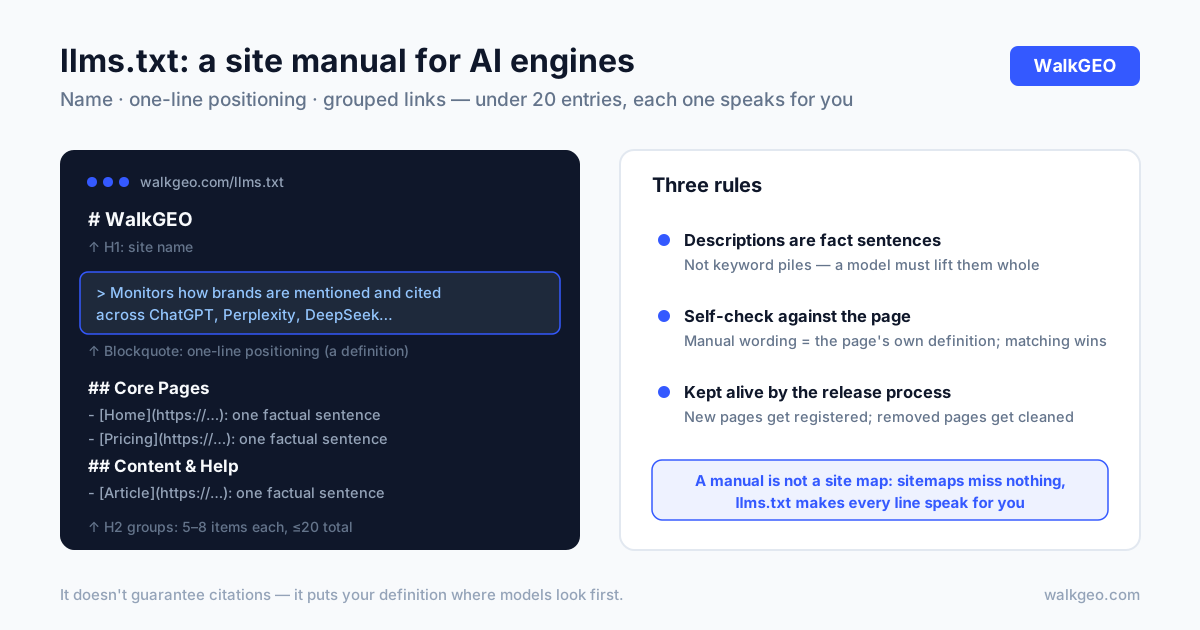
Copy this template — it's the structure our own site uses:
# Your Site Name

> One-line positioning: what it does, for whom, covering what.
25–50 words, written like an answer capsule.

## Core Pages

- [Page title](https://yourdomain.com/path): one factual sentence
- [Page title](https://yourdomain.com/path): one factual sentence

## Content & Help

- [Article title](https://yourdomain.com/path): one factual sentence
Three writing rules:
- The blockquote is a definition sentence. "We have years of experience" fails; "monitors how brands are mentioned and cited across engines like ChatGPT, Perplexity, and DeepSeek" works — the model can lift it whole.
- Each link description is a fact sentence, not a keyword pile. "GEO, AI SEO, AI visibility, optimization tool" extracts to zero information.
- Groups use H2, five to eight items each. Group by how users think (product, content, help), not by your org chart.
One self-check trick for the descriptions: compare each one against its target page. The best description isn't a fresh invention — it's a trimmed version of that page's own definition sentence. Models cross-check the manual against the page; matching versions reinforce each other, mismatched ones lose credibility together. If a page has no definition sentence yet, fix the page first, then come back — writing the manual first is hanging a door sign on an empty room.
Step 3: Deploy and verify
What: serve the file at the root path and confirm it's reachable. Why: the convention places it at yourdomain.com/llms.txt; a file in a subdirectory won't be found. Done when: the URL returns content with clean Markdown structure.
Two deployment styles. Hand-write a static file and upload it to the root — fine for stable sites. For sites that change often, generate it at build time: maintain a list of "title + URL + description" in your code, and have the build script render it into llms.txt. The generated approach puts the list under version control, so changes have authors and history. On WordPress or a hosted builder, look for a custom-files or header-injection capability; the effect is the same.
Verify in three steps: curl the URL and confirm a clean 200 with full content; check the three parts are present; paste the blockquote into an AI engine and ask "what does this company do?" That last step isn't a magic test — it's definition QA. If the paraphrase is wrong, go back and fix the blockquote.
Common traps
| Symptom | Cause | Fix |
|---|---|---|
| Manual swells past a hundred links | "More is better" | Cut to twenty; keep only pages that speak for you |
| Descriptions are slogans and keyword strings | Written like SEO meta | Rewrite each as a liftable fact sentence |
| Published once, never touched since | No owner, no process | Into the release checklist: new key pages get registered |
| Pages go offline; manual links 404 | Deleting pages without checking references | Clean the manual on every page removal; spot-check with curl |
| Only one language registered | Bilingual site, single list | Both languages in the list, each labeled |
The first and fourth rows together are the classic failure: stuff it full once, then let it rot. A manual is a living document, and the test for whether yours is alive is simple — does your release checklist mention it?
The manual is one of three machine files
Root-level machine files blur together; here's the division:
| File | Reader | Contents | Goal |
|---|---|---|---|
| robots.txt | All crawlers | Who may fetch what | Clear access rules |
| sitemap.xml | Search engines | Every indexable URL | Miss nothing |
| llms.txt | AI engines & agents | Positioning + curated read | Every line speaks for you |
The three files are projections of the same set of facts: who you say you are (the manual's blockquote), what content exists (the sitemap), what machines may see (robots). Aligned, they reinforce each other. Any one contradicting the actual pages costs the entity credibility at cross-check time. That's why our build script generates all three from one link registry — consistency by construction, not by discipline.
Case: walkgeo.com generates its manual at build time
Our own llms.txt is not handwritten. The mechanism: a link registry in code — each entry holding a title, URL, and one description — covering the homepage (both languages), the help center, the pricing page, and every blog article. The build script renders that registry into Markdown with the H1, blockquote, and a ## Product group, deployed at the root. The rendered result is what engines see at walkgeo.com/llms.txt.
Two disciplines we learned by paying for their absence. First, new articles must be registered — the manual does not update itself, and a hand-maintained list fails silently, so registration is a line on the release checklist next to images, build, and QA. We genuinely missed one once; the story is in why AI doesn't mention your brand. Second, descriptions stay source-consistent: every line in the registry is a tuned version of that page's own definition sentence, not a parallel copy. Models compare the manual to the page; two versions of the truth score down together.
One deliberate omission worth noting: no application-console routes in the list. The manual is for external engines — console paths carry no crawler value and don't belong in any public manifest. Same philosophy as robots.txt: who you let in and who you introduce are decisions you made, not defaults.
How you know it worked
Four checks, all self-serve:
- Reachable:
yourdomain.com/llms.txtreturns 200, no redirects. - Three parts present: H1 name, blockquote positioning, H2 groups.
- Live entries: every URL in the list returns 200. Zero 404s.
- Paraphrase right: feed the blockquote to any engine, ask what the company does, compare against your definition.
Honesty on outcomes: publishing llms.txt does not guarantee citations. It packages your material into the most checkable form. Real movement shows up in the frozen question set re-tested weekly — the protocol is in measuring brand AI visibility. And if the door isn't even open — AI crawlers blocked — do the robots.txt self-audit first; that's further upstream.
FAQ
Is llms.txt an official standard? Do engines actually read it?
Not official — it's a community spec (llmstxt.org, proposed 2024). Adoption varies: engines that recognize it treat it as a guided read; the rest ignore it. The cost is minutes with no side effects, so it's a "won't lose" bet — but it is not a citation switch.
How is llms.txt different from sitemap.xml?
A sitemap serves crawlers: the full URL inventory, optimized to miss nothing. llms.txt serves models: a curated read, optimized so every entry speaks for you. You want both — the sitemap earns the crawl, the manual earns the understanding.
How often should llms.txt be updated?
Whenever a key page appears; otherwise leave it alone. The side to watch is removals — pages going offline or changing paths need the list cleaned the same day. Bake registration and cleanup into the release process; that beats remembering to "review periodically."
Will a 20-line manual waste the rest of my pages?
No. The manual is a guided read, not an inventory — unlisted pages remain in the sitemap and fully retrievable. To give deep content more entrances, link to it from the pages already in the manual; that's how the cluster grows, not by stuffing the list.
The work in a site manual is in the choosing, not the writing: under twenty lines, each one speaking for you, kept alive by the release process. It's not a traffic switch — it's your definition sentence placed where models look first. That position shouldn't be left to an empty default. WalkGEO scores llms.txt as part of a site's GEO readiness — see pricing for the full picture, or start with the five-minute setup in our help center.
Done reading? Run the same audit on your own site
Sign up, then let the agent scan every page and hand you a prioritized fix list. Your first audit is free.
Run a free site audit