Free · No signup

Free Single-Page GEO Check

The Single-Page GEO Check helps you see in 30 seconds whether a page can be cited by AI: 65 checks across six categories, plus robots, llms.txt and structured-data gates. Built for site owners, content teams and SEO consultants — run it after publishing an article or shipping a redesign.

By the WalkGEO content team Last updated: Content standards

Free quota: 4 checks/minute · 15/hour.

According to 2024 GEO research from Princeton, Georgia Tech and IIT Delhi, AI engines extract passages with specific shapes — self-contained answer blocks, crawlable gates, and machine-readable structure (Princeton, Georgia Tech & IIT Delhi, 2024). The check breaks that into 65 verifiable checks with per-item pass/warn/improve guidance, using the same rule set as the WalkGEO full-site audit. Use cases: verify citability right after publishing a new article, re-check a redesigned landing page, and investigate why a whole group of questions lost citations.

Unlike a traditional SEO audit, everything here measures one question: can AI read and cite you? Is the page frame clear, are heading levels unbroken, does the content carry specific numbers and named entities, can an answer block stand alone outside its context, are AI crawlers blocked by robots.txt (per-engine policies in the Google Search Central crawling docs), is there an llms.txt guide, does Schema declare the page type? The scoring matches mainstream single-page audit tools: category score = (passed + 0.5×warned) / checks, total is the mean of the six, pass mark is 70.

How to read the report: score first, then the category that drags

A report has one total, six category bars and 65 rows of detail. Read it in the order below and you can locate the problem in about three minutes.

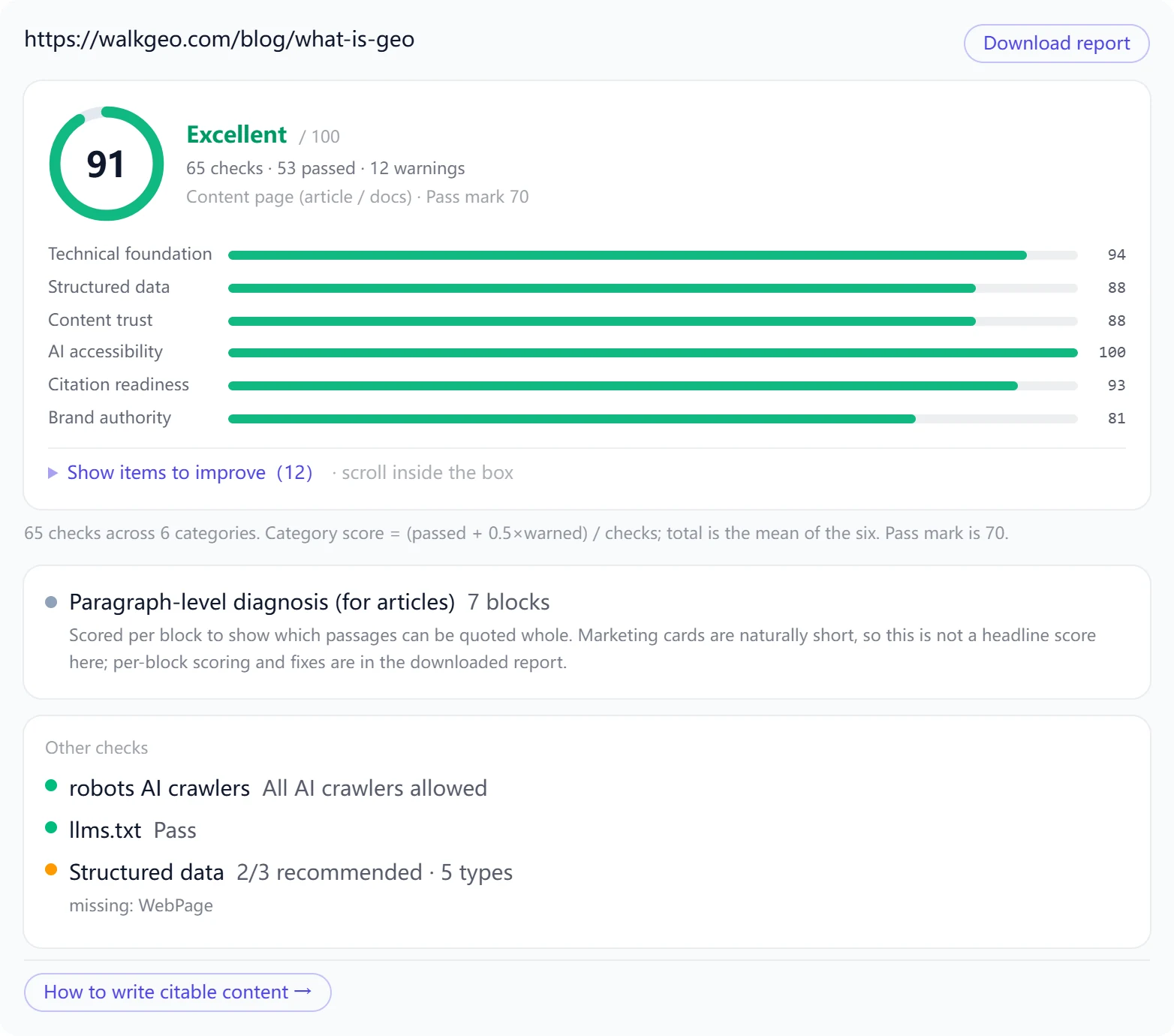
Example single-page GEO check result: walkgeo.com/blog/what-is-geo scores 91 with 53 of 65 checks passed and 12 to improve. Category scores: technical foundation 94, structured data 88, content trust 88, AI accessibility 100, citation readiness 93, brand authority 81.
Example: this tool run on one of our own articles (91 · 65 checks · 12 items to improve). The downloaded report shows the evidence behind every check.
01

The total is a coarse filter — 70 is the pass mark

The total is the arithmetic mean of the six categories. It tells you whether the page can enter the candidate pool for AI answers: below 60 it usually will not, above 70 the structure is sound and what remains is content polish. The total does not tell you what to change — that is the next step.

02

The six category bars tell you where you are stuck

Start with the lowest category. Two typical shapes: technical foundation at 100 but citation readiness at 60 means the page is crawlable yet the copy does not read like an answer block; citation readiness at 90 but technical foundation at 60 means the writing is good but AI crawlers cannot get in — the more painful case, because one robots rule could fix it.

03

Fix red first, amber second

"Must fix" items are hard blockers that stop AI from crawling or rendering the page — handle them first. "Should fix" items are points on the board; batch them by category. Change no more than ten items at a time, otherwise you cannot tell which change moved the score.

04

Re-check the same URL after fixing

The score comes from deterministic rules, so the same page scores identically on every run. That means you can compare before and after directly. Change a batch, run the check, write the number down — far more reliable than going by feel.

What each category measures, and how to fix it

Each card lists the deductions that category sees most often, plus the fix. Open your own report and work through it category by category.

Technical foundation

Whether AI can fetch and render the page cleanly. 8 checks: DOM size, render-blocking resources, above-the-fold lazy loading, inline JS weight, image dimensions, viewport, canonical, horizontal scroll on mobile.

Common deductions

  • Images without width and height, so the box collapses before load and the layout shifts
  • Several synchronous scripts in head, pushing the first paint back
  • The hero image marked loading="lazy", which slows LCP directly

How to fix

  • Add width and height to every img — CSS still controls the displayed size
  • Add defer or async to scripts; add fetchpriority="high" to the hero image
  • Keep DOM nodes under 2,000; going over usually means components nested too deep

Structured data

Whether machines can read who you are and what this page is. 8 checks: JSON-LD present, parses, required fields, Organization completeness, sameAs, entity naming, page-type match, breadcrumbs.

Common deductions

  • Only Organization declared, with WebSite and WebPage missing
  • Organization has no sameAs, so AI cannot align the brand with outside sources
  • schema says WalkGEO while the title says something else

How to fix

  • Complete the Organization + WebSite + WebPage trio
  • Point sameAs at real profiles: social pages, encyclopedia entries, GitHub repos (source: the schema.org sameAs definition)
  • For bilingual brands, declare the alias in alternateName so the two names stop fighting

Content trust

Whether the content reads like it came from a credible source. 16 checks: value proposition, target audience, lead concision, readability, methodology, author info and byline, authoritative citations, editorial policy, number density, customers and testimonials, updated date, contact, legal links, claim attribution.

Common deductions

  • Not a single concrete number on the page — only adjectives
  • No byline, so AI cannot tell who is making the claim
  • Borrowed conclusions with no source given

How to fix

  • Give every claim a source: institution + year + number
  • Add an author card on articles: name, role, relevant background
  • Put privacy policy, terms and a clickable contact in the footer

AI accessibility

Whether what AI reads is the same thing you see. 10 checks: H1 present and unique, indexable, body text in HTML, semantic landmarks, html lang, heading order, image alt, text-to-markup ratio, footer not script-injected.

Common deductions

  • Body copy rendered by JS, so the crawled HTML is empty
  • Two H1s on one page, or none at all
  • Heading levels jumping from h2 straight to h4

How to fix

  • Server-render or prerender the key body copy instead of waiting on JS
  • One H1 per page; organise the rest with h2 and h3
  • Step heading levels down one at a time

Citation readiness

Whether a passage can be lifted whole. 14 checks: self-containment, answer-block length, numbers, named entities, definition sentence, question-style headings, answer immediacy, numbered structure, lists and tables, originality signal, filler intro, block count, heading length, FAQ structure.

Common deductions

  • Paragraphs opening with "it", "this" or "therefore" — meaningless once extracted
  • Headings like "Our advantages" instead of the question a user would ask
  • Three paragraphs of setup before the answer, so AI skips past

How to fix

  • Give the first sentence a full subject: change "it lifts conversions 37%" to "WalkGEO monitoring lifts conversions 37%"
  • Rewrite headings as the question users actually ask, e.g. "How is GEO different from SEO?"
  • Put the answer in the first paragraph under the heading; move setup below

Brand authority

Whether AI can confirm you are a real entity. 8 checks: naming consistency, logo, social footprint, about page, contact entry, Wikipedia/Wikidata, GitHub ecosystem, external authority sources.

Common deductions

  • No about page, so nobody knows who you are or where the team sits
  • No third-party page mentions you anywhere
  • The brand name is spelled differently in different places

How to fix

  • Build an about page: what the company does, who is on the team, where it is registered, how to reach it
  • Fill sameAs with every external link that proves identity
  • Earn third-party mentions: trade press, open-source repos, review sites
Fix in this order, not item by item

Each step is the precondition for the next — get the order wrong and the later work is never seen.

  1. 1

    Open the door: unblock crawlers, ship real HTML

    Let index crawlers through in robots (GPTBot, PerplexityBot, Bytespider), allow the page to be indexed, and make sure body copy is in the HTML. Skip this and every later optimisation counts for zero.

  2. 2

    Declare your identity: schema and sameAs

    Add Organization + WebSite + WebPage, fill sameAs, and make the name in schema match the name in title. AI has to know who you are before it can cite you.

  3. 3

    Fix the structure: H1, hierarchy, landmarks

    One H1 per page, unbroken heading levels, semantic landmarks (header, main, article, footer), alt text on images. These are the signposts AI uses when splitting a page into passages.

  4. 4

    Fix the content last: answer blocks and sources

    Make answer blocks self-contained, rewrite headings as questions, attach a number and a source to every claim, add FAQ structure. This layer moves slowest but decides whether you get quoted at all.

What this score is — and is not

The score comes from 65 deterministic rules and calls no AI model at all. The same page scores identically today, tomorrow, and in someone else's hands — which is exactly what makes before-and-after comparison possible.

It measures page features that correlate strongly with being citable. That is a proxy, not the actual behaviour of an AI engine. A high score does not guarantee a citation, but a low score almost certainly means none. The thresholds are not arbitrary: data from 61 real pages was used to calibrate every cut-off (November 2026), so each one lands where it actually separates good pages from bad.

To find out whether AI really cites you, you have to ask: search your brand and core questions in ChatGPT, Perplexity, Gemini, Claude or Copilot and see whether you show up in the answer. That is a different job — and it is what the WalkGEO product does every day.

Three common uses

  1. Right after publishing: run the check, confirm answer blocks, schema and robots are in place, then submit for indexing. Submitting with structural gaps means AI crawls a half-built page.
  2. After a redesign: compare the score before and after. The most common redesign regression is moving body copy into client-side rendering.
  3. When citations suddenly vanish: check the gates first. Nine times out of ten robots gained a blocking rule, or the page moved to JS rendering and the crawled HTML is now an empty shell.

FAQ: scope, scoring, and limits

Does this check my whole site or one page?

One page at a time. The GEO check analyzes a single URL, ideal for validating your most important articles and landing pages first. For the entire site, use the WalkGEO full-site audit, which covers every page and prioritizes the fixes.

How is the score in the report computed?

The total is the arithmetic mean of six category scores, where a category score = (passed + 0.5×warned) / checks in that category. Pass mark is 70 — the same scheme mainstream single-page audit tools use, so numbers are comparable. A paragraph-level diagnosis comes with it: every content block is scored so you can see which passages can be quoted whole and which need rewriting, with the per-block breakdown in the downloaded report.

Does a high score mean AI will cite me?

No. The score measures whether the page is eligible to be cited. Whether an engine actually cites you also depends on brand recognition, how well the page matches the question, and what competitors say on the same question. A low score almost certainly means no citation; a high score only gets you into the room.

Why does another tool give this page a different score?

Because the check sets and weights differ. Some tools include security headers such as CSP, TLS version and Permissions-Policy, which can account for more than half the weight; others only look at content. Across tools, compare trends rather than absolute numbers — whether the score went up matters more than what it says.

How long after fixing does it take effect?

Technically it is immediate: re-run the check and the score changes at once. AI engine indexes lag behind, typically days to weeks depending on crawl frequency. Gate-level fixes like robots and llms.txt take effect quickly; content-level fixes wait for the next crawl.

Some crawlers are blocked — does that matter?

It depends which ones. Blocking index crawlers like GPTBot or PerplexityBot means the corresponding engines cannot cite your pages; blocking pure training crawlers does not affect citations. The tool lists each crawler by name with its status.

Are results stored or shared?

No. Checks run live and return only to your browser — nothing is stored or published. Free quota: 4 checks per minute, 15 per hour.

Related reading

Also need an llms.txt? Use the free generator →

SIGN UP · FIRST AUDIT FREE

One site audit. A clear order of what to fix first.

Sign up, then let the agent scan every page and hand you a prioritized fix list.

Run a free site audit
First audit freeEvery page scannedDownloadable report
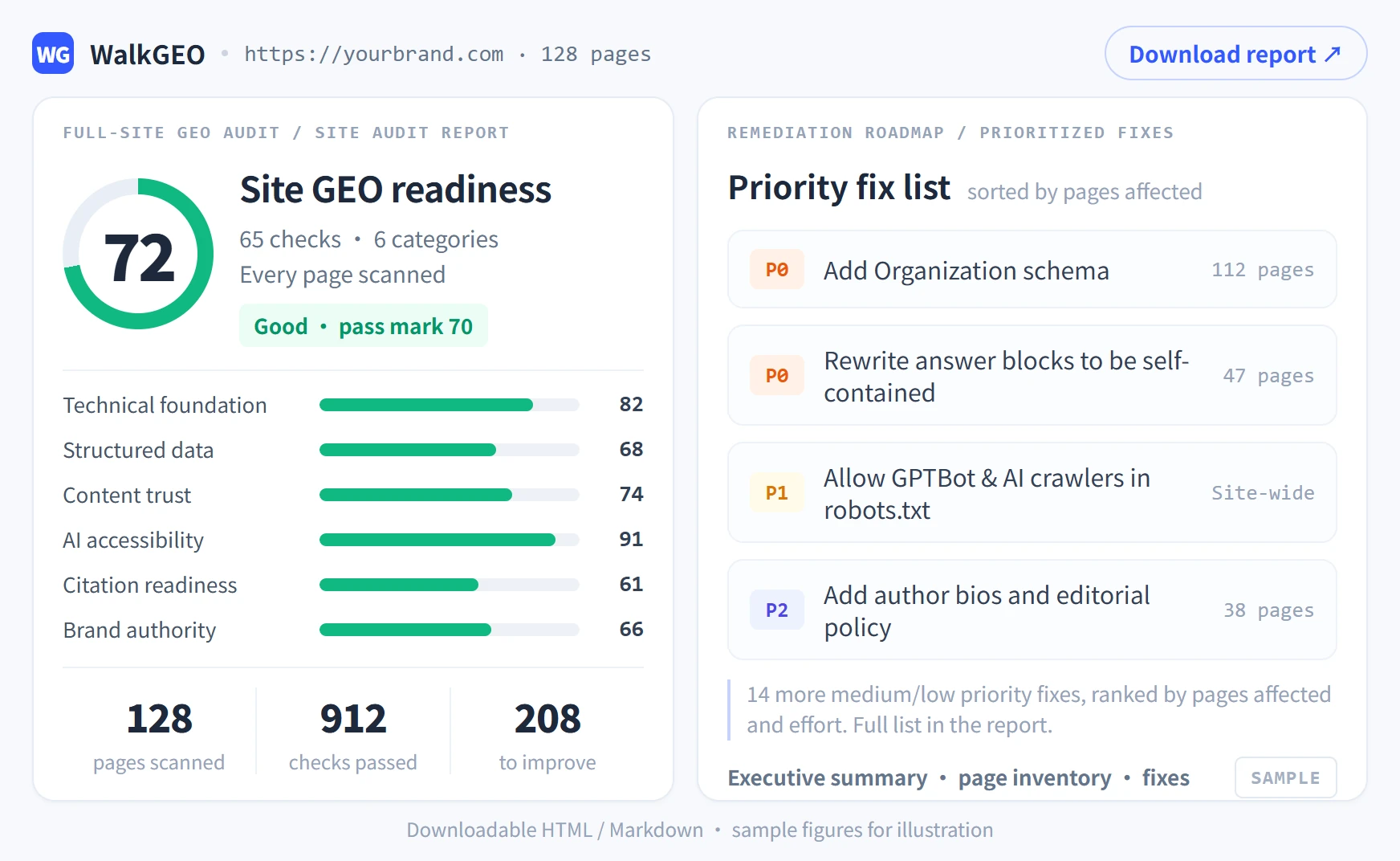
Site audit report layout preview: site-wide GEO score, six check categories and a prioritized fix list
SITE AUDIT REPORT · LAYOUT PREVIEW · DOWNLOADABLE